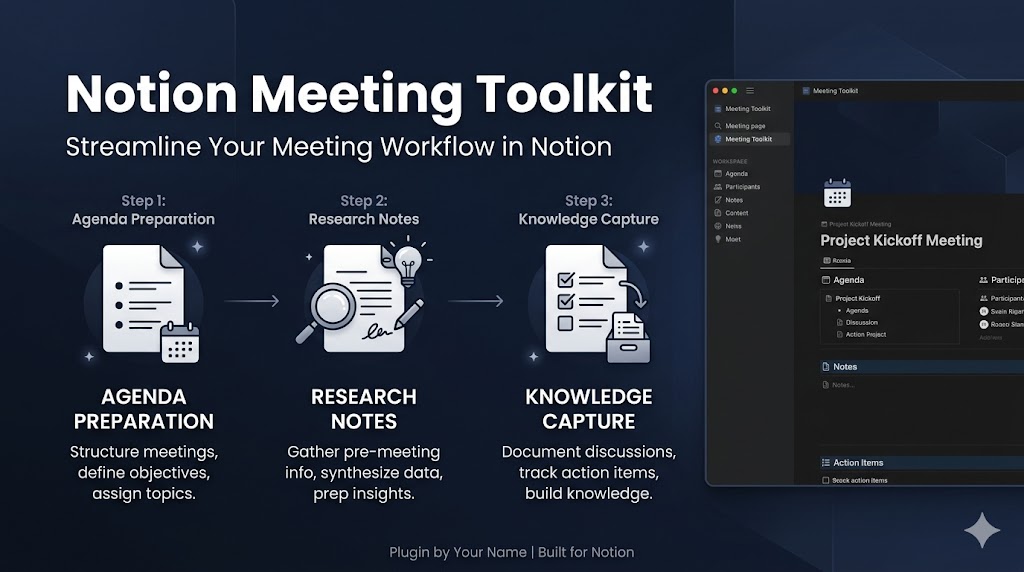
Notion Meeting Toolkit
Prepare meetings, organize research, and capture reusable knowledge in one Notion workflow.
Install
Run this command to install all skills in this plugin:
npx skillstore add @notion-meeting-toolkit Skills will be installed to .claude/skills/ directory
Overview
Usage Guide
Enhanced by AIDetailed Guide
# Notion Meeting Toolkit — Usage Guide

## What This Plugin Does

Notion Meeting Toolkit connects three Notion-powered skills to handle the full lifecycle of a meeting: preparation, in-meeting research, and post-meeting knowledge capture. Use it to stop losing insights between meetings.

---

## Complete Workflow Example

**Scenario:** You have a product strategy meeting tomorrow with 5 stakeholders.

**Step 1 — Meeting Preparation** (`notion-meeting-intelligence`)
```
Prepare a Notion meeting page for: Product Strategy Review
Date: tomorrow 2pm, Attendees: PM, CTO, 3 engineers
Agenda: Q2 roadmap prioritization, technical debt review, launch timeline
```
Output: Notion page with agenda, attendee list, pre-read links, and open questions section.

**Step 2 — Research & Documentation** (`notion-research-documentation`)
```
Create a research note in Notion for: competitor analysis on our top 3 rivals
Link to the Product Strategy meeting page
Include: key findings, source URLs, summary table
```
Output: Structured research document linked to the meeting page, with sections for findings and action items.

**Step 3 — Knowledge Capture** (`notion-knowledge-capture`)
```
After the meeting, capture key decisions:
- Decision: Prioritize mobile onboarding in Q2
- Rationale: 60% of new users on mobile, drop-off at step 3
- Owner: PM, Deadline: April 15
Save to our product decisions knowledge base
```
Output: Reusable knowledge entry tagged by project, decision type, and date — searchable in future meetings.

---

## Scope & Boundaries

**This toolkit is designed for:**
- Teams already using Notion as their primary workspace
- Recurring meeting types (standups, strategy reviews, 1:1s)
- Knowledge work where decisions need to be traceable

**This toolkit does NOT replace:**
- Full project management systems (Jira, Linear, Asana) — it captures decisions, not tasks
- CRM or client management tools
- Real-time meeting transcription (it works from your notes, not audio)
- Notion itself — you need an active Notion workspace with appropriate permissions

---

## Failure Recovery

**Notion permission errors:**
If the skill cannot write to a page, check: (1) your Notion integration has edit access to the target database, (2) the database schema matches expected properties. Fix permissions in Notion Settings → Integrations, then retry.

**Database structure mismatch:**
If properties like `Status`, `Date`, or `Owner` are missing from your Notion database, the skill will return a descriptive error. Add the missing property manually in Notion, then re-run the command.

**Missing templates:**
If no meeting template exists in your workspace, the skill will create a basic page structure. For richer output, create a Notion template first and reference it in your prompt: `Use the Q2 Review template`.

**Content not saving:**
If output seems correct but nothing appears in Notion, verify the integration token is still valid (tokens expire if revoked). Re-authorize via Notion Settings → Connections.
Skills
3notion-meeting-intelligence
Low Risk 68Prepare meeting materials with Notion context and Codex research; use when gathering context, drafting agendas/pre-reads, and tailoring materials to attendees.
notion-research-documentation
Safe 70Research across Notion and synthesize into structured documentation; use when gathering info from multiple Notion sources to produce briefs, comparisons, or reports with citations.
notion-knowledge-capture
Safe 69Convert conversations and notes into structured Notion pages using the Notion MCP. Transforms chats into wiki entries, how-tos, decisions, FAQs, and documentation with proper linking and organization.
Similar Plugins
Claude Code Power Tools
Add hooks, headless runs, and MCP integrations to turn Claude Code into a programmable workflow engine
3 skills
Dev Release Regression Check
发布后关键路径自动回归检查插件(含失败兜底)
3 skills

Docker Container Toolkit
Docker containerization end-to-end — audit Dockerfiles, orchestrate multi-service builds, and deploy to Kubernetes. One toolkit for your container workflow.
3 skills