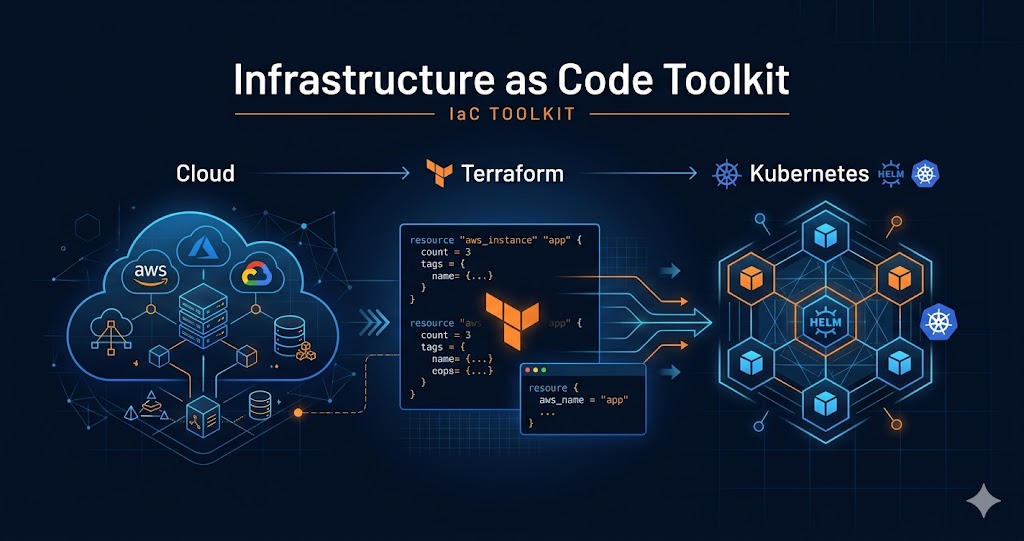
Infrastructure as Code Toolkit
Provision cloud resources with Terraform, package applications with Helm, and deploy to Kubernetes — the complete IaC workflow in one toolkit.
Install
Run this command to install all skills in this plugin:
npx skillstore add @infrastructure-as-code-toolkit Skills will be installed to .claude/skills/ directory
Overview
Usage Guide
Enhanced by AIDetailed Guide
# Infrastructure as Code Toolkit — Usage Guide

## What This Plugin Does

Infrastructure as Code Toolkit connects three skills to cover the complete cloud deployment lifecycle: provision infrastructure with Terraform, package your application with Helm, and deploy it to Kubernetes. Use it to go from zero to a running production environment without leaving your AI assistant.

> **Note:** The Terraform skill is currently AWS-focused (EKS, VPC, IAM). Azure and GCP module templates are not yet included. For multi-cloud setups, use this toolkit for AWS-side provisioning and adapt the generated HCL manually for other providers.

---

## Complete Workflow Example

**Scenario:** Deploy a Node.js API to AWS EKS.

**Step 1 — Provision Cloud Infrastructure** (`wshobson-terraform-module-library`)
```
Create a Terraform module for AWS EKS cluster:
- Region: us-east-1
- Node group: 3x t3.medium
- VPC with private subnets
- Enable cluster autoscaler

Run: terraform init → terraform plan → terraform apply
```
Output: Terraform module files (`main.tf`, `variables.tf`, `outputs.tf`) with the EKS cluster, node group, and networking configured. Plan shows ~12 resources to create. Apply provisions the cluster in ~15 minutes.

**Step 2 — Package the Application** (`wshobson-helm-chart-scaffolding`)
```
Create a Helm chart for my-node-api:
- Image: my-registry/node-api:v1.2.0
- Replicas: 2
- Port: 3000
- Health check: /health
- ConfigMap for environment variables
- HorizontalPodAutoscaler: 2-10 replicas at 70% CPU
```
Output: Complete Helm chart with `Chart.yaml`, `values.yaml`, `templates/deployment.yaml`, `templates/service.yaml`, `templates/hpa.yaml`, and `templates/configmap.yaml`. Includes a `validate-chart.sh` script (runs `helm lint` + `helm template`) to catch errors before deployment.

**Step 3 — Deploy to Kubernetes** (`wshobson-k8s-manifest-generator`)
```
Generate K8s manifests to deploy my-node-api to the EKS cluster:
- Namespace: production
- Deployment: 2 replicas, resource limits 256Mi/500m
- Service: ClusterIP on port 80
- ConfigMap: LOG_LEVEL=info, NODE_ENV=production
- Secret: DATABASE_URL from Secrets Manager
```
Output: `deployment.yaml`, `service.yaml`, `configmap.yaml`, `secret.yaml` ready for `kubectl apply -f`.

---

## Scope & Boundaries

**This toolkit requires:**
- Local CLI tools installed: `terraform` (>=1.0), `helm` (>=3.0), `kubectl` configured to your cluster
- AWS credentials configured (`aws configure`) for the Terraform skill to work
- An existing Kubernetes cluster or one provisioned in Step 1

**This toolkit does NOT:**
- Execute `terraform apply` or `kubectl apply` for you — it generates the files, you run the commands
- Replace a full CI/CD pipeline (GitHub Actions, ArgoCD, FluxCD) — use those for automated deploys
- Cover Azure or GCP Terraform modules — currently AWS-only
- Manage cluster upgrades, certificate rotation, or secret rotation

---

## Failure Recovery

**Terraform: Provider not configured**
Error: `No valid credential sources found`. Fix: Run `aws configure` before `terraform init`. Verify with `terraform plan` — it will show the auth error before touching any resources.

**Terraform: Permission denied**
Error: `AccessDenied` during apply. Add the missing IAM permission (shown in the error), then re-run `terraform apply` — Terraform will only create the remaining resources.

**Helm: Chart validation fails**
Run `helm lint ./my-chart` or the included `validate-chart.sh` to see specific errors. Fix the reported YAML issue, then re-lint before deploying.

**Helm: Release already exists**
Error: `cannot re-use a name that is still in use`. Use `helm upgrade my-release ./my-chart` instead of `helm install`.

**kubectl: Cluster unreachable**
Error: `Unable to connect to the server`. Fix: Run `aws eks update-kubeconfig --name <cluster-name> --region <region>` to refresh credentials, then verify with `kubectl get nodes`.

**Pod CrashLoopBackOff after deploy**
Run `kubectl logs <pod-name> -n production` to see application errors. Check ConfigMap keys and Secret references match what the application expects. Fix the manifest and re-apply.
Skills
3terraform-module-library
Safe 70Build reusable Terraform modules for AWS, Azure, and GCP infrastructure following infrastructure-as-code best practices. Use when creating infrastructure modules, standardizing cloud provisioning, or implementing reusable IaC components.
helm-chart-scaffolding
Low Risk 77Design, organize, and manage Helm charts for templating and packaging Kubernetes applications with reusable configurations. Use when creating Helm charts, packaging Kubernetes applications, or implementing templated deployments.
k8s-manifest-generator
Safe 73Create production-ready Kubernetes manifests for Deployments, Services, ConfigMaps, and Secrets following best practices and security standards. Use when generating Kubernetes YAML manifests, creating K8s resources, or implementing production-grade Kubernetes configurations.
Similar Plugins

Frontend UI Mastery
Build production-grade frontend interfaces with accessibility, reusable components, and responsive design. Covers WCAG compliance, component architecture, and mobile-first layouts.
3 skills
Claude Code Power Tools
Add hooks, headless runs, and MCP integrations to turn Claude Code into a programmable workflow engine
3 skills

Docker Container Toolkit
Docker containerization end-to-end — audit Dockerfiles, orchestrate multi-service builds, and deploy to Kubernetes. One toolkit for your container workflow.
3 skills